When you ask an AI agent to "check my warehouse stock" or "book this appointment for me," that agent needs to be able to securely connect to your internal systems — not with full, risky access, but with a limited, controlled set of tools. This is exactly the problem the Model Context Protocol, or MCP, was designed to solve.
What Exactly Is MCP?
MCP is an open-source protocol introduced by Anthropic that provides a shared language for connecting language models to tools, data, and external systems. Instead of every AI model building a custom interface for every service, MCP provides a standard middle layer: any server implemented per MCP can be used by any model that supports MCP.
MCP Architecture: Client, Server, and Host
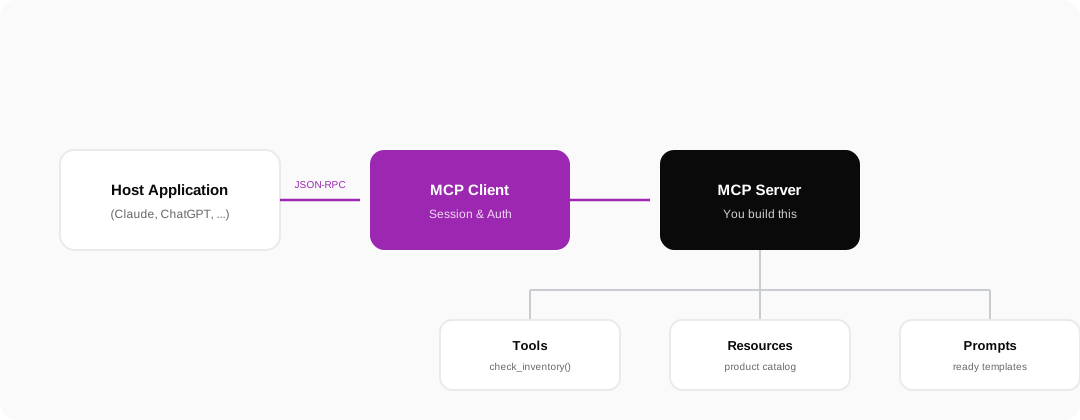
MCP has three main roles. The Host Application is the app the user directly works with (like an AI assistant). The MCP Client lives inside that same application and is responsible for establishing and managing the connection. The MCP Server is what you, as the business owner, build, and through it you expose your own tools and data to the agent — with full control over what's made available.
The Three Core Primitives of an MCP Server
- Tools — functions the agent can execute, like
check_inventory()orbook_appointment() - Resources — data the agent can read, like a product catalog or a return policy
- Prompts — ready-made templates that suggest to the agent how to interact optimally with your server
Why Is MCP Critical for Online Stores?
Without MCP, the only ways to connect AI to your internal systems are giving it full database access or writing fragile, custom-built integrations — both options are risky and expensive. MCP creates a clear security boundary: you decide exactly which functions are available, what data can be read, and where every call comes from.
- Precise access control instead of full database access
- The ability to log and trace every agent request
- Rate limiting at the level of each individual tool
- Compatibility with any AI model that supports MCP, with no re-development needed
What's the Difference Between MCP and UCP?
These two protocols are often mixed up, but they play completely different roles. UCP is designed for general commercial transactions — product search, cart, checkout — and is available to any agent that visits your site. MCP, on the other hand, is designed for secure, private access to internal systems, typically in a more direct relationship with a higher level of trust between the business and the AI assistant. In practice, many businesses use both side by side.
UCP is the front door of your store; MCP is the key that only lets authorized people and agents into the back office.
How Do You Build a Simple MCP Server?
- List the tools you want available to the agent (e.g. checking stock, booking an appointment)
- For each tool, define the input, output, and execution logic in your backend
- Implement the server with one of the official MCP SDKs (for Python, Node.js, and others)
- Restrict access: only expose the data and operations that are actually needed
- Test the server with an MCP client
Frequently Asked Questions About MCP
Does MCP only work with Anthropic models?
No. MCP is an open standard, meant to be compatible with any AI model or platform that supports its implementation.
Does implementing MCP require changes to my existing site?
Usually not. An MCP server can run as an independent service alongside your existing site, connected only to the parts of your data that you decide to expose.
Do I need to implement MCP and UCP at the same time?
They don't have to happen together, but it's recommended. For a quick start, build UCP first with the free generator, then move on to MCP following the step-by-step implementation guide.